Overview
As part of the LearnToCloud course, phase 2 was focused on networking fundamentals, including topics such as the OSI model, TCP/UDP, IP addressing, DNS, protocols, ports, subnetting and more. This section ended with a capstone lab simulating a real world scenario in which you are to troubleshoot and fix 4 network related tickets ranging from DNS misconfiguration to security vulnerabilties.
What I Learned
- Networking fundamentals and theory
- Network troubleshooting
- Configuring networks within Azure
The first hurdle: setting up the lab
In order to set up the lab you first need to fork then clone the GitHub repository and then run the setup script which uses terraform to deploy a misconfigured network to your cloud provider subscription, in my case I am using Azure so to my Azure subscription. Once the repo was cloned to my machine I ran the setup.sh script and ran into my first problem.
The setup script uses the Azure region "eastus" and the "Standard_B1s" size for the lab VMs, as I am from Australia I decided to change the region to "australiaeast", I ran the script and was given an error:
"4 vCPUs are needed for this configuration, but only 0 vCPUs (of 4) remain"
I Started scouring the web for answers, from my research I found I had 2 options, try another region with different quotas or request more from Azure, I began trying different configurations of regions and VM sizes, none were working, I tried for over an hour, deploying, destroying, deploying, destroying, nothing would work. I even copied the configuration from the Phase1 lab that someone had mentioned on the forum as I remember having trouble with a similar issue, nothing still. That's when I scoured the forum again, hoping someone else had encountered a similar issue, and there it was, the perfect configuration:
Region: "westeurope"
Size: "Standard_D2s_v3"
I ran the script, deployed, and the network was finally up and running.
The network diagram
┌───────────────────────────────────────────────────────────────┐
│                    VNet (10.0.0.0/16)                         │
│  ┌────────────────┐  ┌────────────────┐  ┌────────────────┐   │
│  │ Public Subnet  │  │ Private Subnet │  │    Database    │   │
│  │  10.0.1.0/24   │  │  10.0.2.0/24   │  │    Subnet      │   │
│  │   - Bastion    │  │   - Web App    │  │  10.0.3.0/24   │   │
│  │   - NAT GW     │  │   - API Server │  │   - Database   │   │
│  └────────────────┘  └────────────────┘  └────────────────┘   │
└───────────────────────────────────────────────────────────────┘
The Task
Using the network shown in the diagram above, I was provided with 4 tickets containing issues and was tasked to fix them, each task is explored below.
Incident 1: API service can't pull external data
This ticket had the following description:
"Our API service that runs on the private subnet stopped being able to fetch data from external APIs this morning. We didn't change anything on our end. Requests to third-party services just hang and timeout. Internal calls between our services still work fine."
How I solved it:
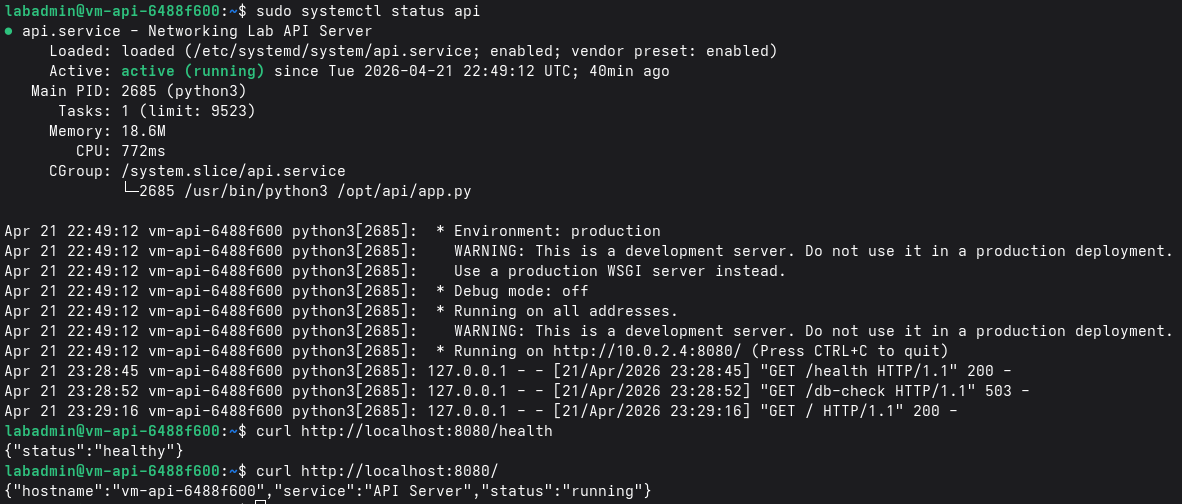
I first SSH'd onto the API server, running a few commands we could confirm the status of the FlaskAPI service that was running on the server.
sudo systemctl status api
using the systemctl status command I was able to confirm the api service was running, I then ran the curl command against localhost:8080 where the api service lives to again confirm the api service was healthy. As there was nothing wrong with the api service itself, I next thought this could be an issue with the firewall blocking traffic. I checked in the outbound rules for the api server's NSG and saw a rule blocking outbound internet traffic.
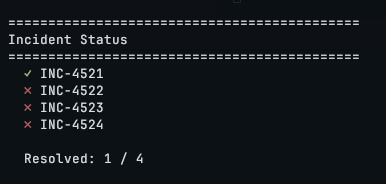
As the API server needs to communicate with external resources this rule should not exist, I deleted the rule and the first ticket was solved.
Incident 2: Service discovery broken
Ticket 2 was related to name resolution, each server should resolve from a given name, api.internal.local, db.internal.local and web.internal.local for the api, database and web server respectively.

Immediately I assumed there is probably a misconfiguration in the DNS settings within our resource group, I first ran the command in the image above to confirm there was an error with name resolution. I then checked the DNS zone in our resource group and noticed there were no records present, I added the below records:
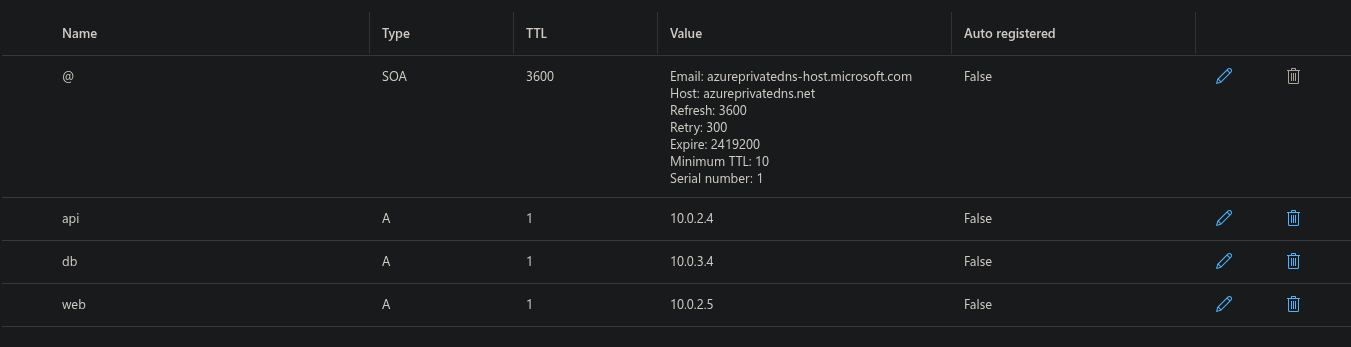
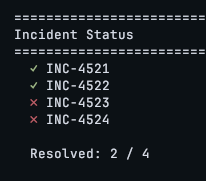
As the DNS zone was under internal.local, addiging the records for web api and db should fix our name resolution issue. I rank the validation script and noticed it was not resolved. I was confused as the records were now set so what could be wrong? I took at look at our DNS zone again and realised there was no linked VNet, of course the DNS won't work if our VNet doesn't know to use it, I linked the VNet, rank the validation script again and the second ticket was now solved.
Notes:
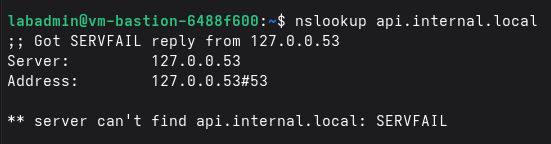
The above nslookup result caused a bit of trouble for me, initially I ran nslookup, dig and dig trace to find where the resolution was having issues. While the checks did confirm there were issues with the name resolution, I relied on this nslookup command to confirm if my implementations had fixed the issue. After the records had been updated and the VNet linked, the validation script confirmed my implementaion had resolved the issue however the nslookup was still giving the above error.
Running the resolvectl status command I was able to see our Azure DNS server was being used however the nslookup command was not working, I did some digging (pun not intended) and learnt that the '.local' at the end of our server names causes linux to try and resolve the name locally, hence the 127.0.0.53 IP, editing the resolv.conf file I was able to resolve this issue even though it was not required for the lab, however a good learning experience none the less. In future I have learnt best practice is to not use .local in our naming and instead go for something like .internal which would have no conflicts.
Incident 3: Web frontend can't reach backend
Incident 3 required the web server to be able to reach the api server on port 8080 however it was being blocked. Again checking the NSG inbound rules all inbound was blocked, I added the below inbound rule:

As the only device that should be connecting to port 8080 was the web server, I decided to add the rule to only allow connections from the web server specifically as this would be best practice security wise for least privilege, with that, the third ticket was complete:
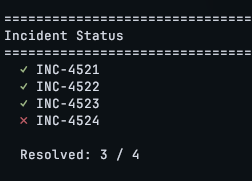
Incident 4: Security audit findings
Ticket 4 was related to a security audit, in this scenario, the security team had completed an audit and had 3 issues flagged I needed to fix, these were mentioned in the ticket description:
                        SSH is accessible from the internet on some hosts (should only be via bastion)
                        The database is directly accessible from the bastion host on port 5432 — it should only be reachable from the API tier subnet
                        ICMP is open from anywhere
How I solved it:
I first noticed in the NSG for each server there was an allow-ssh inbound rule from any

As this was set to 'any', these hosts could be connected to via SSH from anywhere, I updated the rules to only allow SSH from the bastion server as shown below and issue 1 was resolved.

Next I noticed the web server had a rule allowing ICMP from anywhere as shown below, I deleted this rule and issue 2 was resolved.

Lastly the bastion could connect to the DB on port 5432, as the default rules in Azure NSGs are to allow any and all connections from within the VNet, this allowed the bastion to connect. I set a rule allowing the API subnet to be able to connect to port 5432 and set another rule with a higher prioirty to block connections from the bastion:

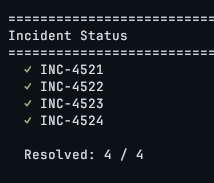
Reflecting on this last objective I believe best practice would have been to block all connections and only allow the API tier subnet to connect to port 5432, my implementation worked however could have been done better in terms of security best practices, however with that, all incidents were resolved:
Conclusion
This lab was a very fun and hands on way to test my networking knowledge that I had learnt throughout phase 2 and from my experience working in IT. Some parts felt easier to me than others such as the DNS issue as I have had more experience debugging those sort of issues in the past. Some parts of the lab I could have done better however I am pleased with my performance and learnt alot from this experience.
Mostly I used the Azure portal to implement changes as I have not used the Azure portal much and thought it would be a good learning opportunity to get comfortable with the layout, I may return to this lab in the future to attempt it only implementing any changes using the CLI and potentially writing a script or too to automate the process. For now I enjoyed my time with this lab and phase and am onto phase 3, python!